Five Checks on Your Password Setup, and the One Page That Holds It Together
A practical audit of the tools and paperwork behind household passwords, written from the side of the person who has to call support and prove who they are.
Joaquin Salcedo·5 min read·1,118 words
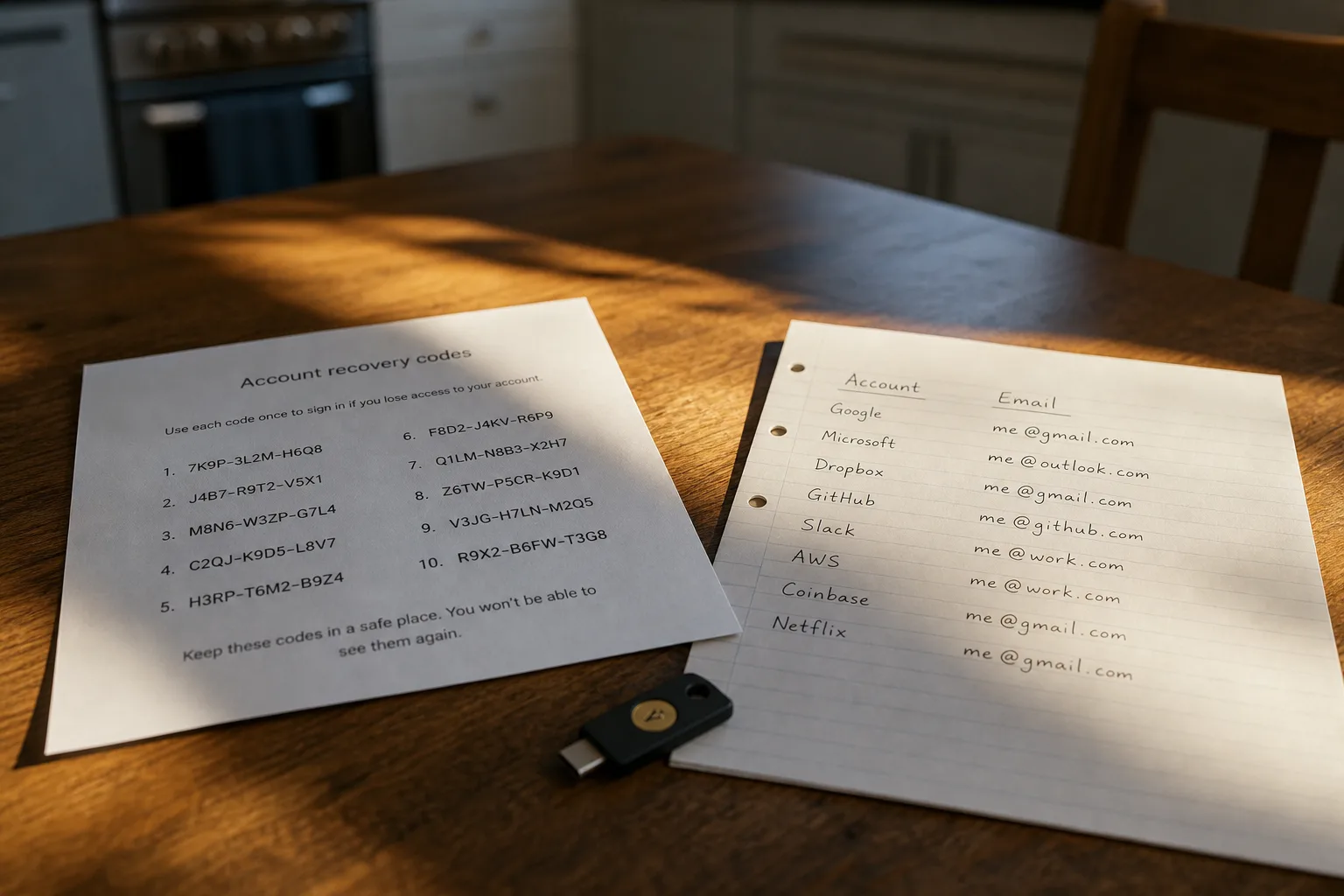
The failure most people eventually meet is not a hacker. It is a locked account on a Tuesday morning, a phone that has been replaced, and a support line that wants a code sent to a number the carrier retired eight months ago. Nothing was stolen and nothing was guessed. The system worked exactly as designed, and the design simply had no room for the ordinary fact that devices change hands. What follows are five checks, each of which can be run from a kitchen table in under an hour, and each of which produces a piece of paper or a record that is worth more than any single strong password.
1. Check what happens to the vault if you are not the one opening it
Every password manager worth using encrypts your data with a key derived from the one password you memorize, which means the company genuinely cannot retrieve it for you. That is the feature, and it is also the trap. Most services now offer some version of emergency access, where a person you nominate can request entry and receive it after a waiting period you set, usually measured in days. Turning that on takes about four minutes. The test that matters is whether the person you nominated knows they were nominated, knows what the request looks like when it arrives, and has their own account set up well enough to receive it.
From the customer's side, this is the difference between a bad week and a bad quarter. Without it, a spouse or an adult child is reduced to calling each institution individually, proving identity by mail, waiting on documents, and discovering that the rules differ at every one. With it, there is a single controlled door. Write down, on actual paper, who holds emergency access and what the delay period is. That sentence is the first line of the page this article keeps coming back to.
2. Check that your recovery codes exist somewhere a power outage cannot reach
When you enable two-factor authentication, the service shows you a block of eight or ten single-use recovery codes and strongly suggests you save them. Almost nobody does. They are the only route back in when the phone is gone, and they are also the item most commonly stored in the worst possible place, which is inside the very account they are meant to recover. Print them. Fold the page into whatever you already consider secure, a fire box or a drawer with a lock, and note the date on the sheet so you know how stale it is.
The National Institute of Standards and Technology is responsible for the federal guidance on digital identity that most modern password advice ultimately traces back to, and the direction of that guidance has moved steadily toward length, uniqueness, and reliable recovery rather than forced complexity and rotation. That shift is good news for a household, because it means the work is front-loaded. You set it once, you record it once, and the system stops demanding quarterly maintenance that never improved anything.
3. Check your inventory against your email archive, not your memory
Ask someone how many online accounts they have and the answer is usually somewhere between twenty and forty. The real number, once you search a long-lived inbox for the phrases that accompany signups and receipts, tends to be several times that. Most of those accounts are dormant and harmless. A meaningful handful are not: the utility with autopay, the pharmacy, the brokerage, the one old retailer still holding a card number from a purchase you have forgotten. Build the list in your manager as you go, and the inventory becomes the audit.
This is also the cheapest security improvement available, because closing an account removes it from every future breach permanently. Deletion requests vary in how willingly they are honored, and the Federal Trade Commission oversees the consumer protection side of how companies handle personal data, which is the framework behind the account-closure and data-deletion options you now see in settings menus. Work through the list in order of what is attached to money. The dormant forum account can wait.
4. Check which second factor you actually have, because they are not equivalent
A code texted to your phone, a code generated by an app, and a physical key you tap against the device are all called two-factor authentication, and the single name hides a wide spread in what each one withstands. Text messages depend on your carrier account staying under your control, which is precisely what an attacker targets when the prize is large. An authenticator app keeps the secret on the device. A hardware key refuses to hand anything over to a site that is not the real one, which is why it defeats the convincing fake login page that defeats careful people.
You do not need the strongest option everywhere. You need it on the email address that can reset everything else, because that account is the master key whether you think of it that way or not. Set the email account to the strongest factor you are willing to live with, keep a second enrolled device or key so a single loss does not strand you, and leave the low-stakes accounts on whatever is convenient. Record on the page which factor guards the email, and where the backup key is kept.
5. Check who else is standing in the shared accounts
Household logins are a quiet category of their own: the streaming service in one name, the internet account in another, the insurance portal that only one spouse has ever opened, the kid's school system tied to a work address. Each has an owner of record, and that ownership usually sits with whichever email receives the billing notices. When the owner is unreachable, the other adult in the house has no standing at all, no matter whose money paid the bill. Shared folders in a password manager fix most of this in an afternoon.
The paperwork half is a single written page, kept with the recovery codes, listing the primary email for each important account, who holds emergency access, where the hardware keys live, and the date you last reviewed it. Not the passwords. The map. A person holding that page can reach everything with the tools you already set up, and the same page tells you, a year from now, which sections of this you have let drift.
Set a date, put the page in the box, and tell one other adult where the box is. The setup that survives contact with a lost phone is almost never the most elaborate one. It is the one somebody else can follow.